
Ektefa · Payroll & Wages · Bonuses & Compensations
A bonus or compensation? Approved and added to that month's payroll automatically
Forgot to include certain dues? The employee submits a request from their account, it goes through the approval workflow, then it is added to the selected month's salary and tracked from “Unpaid” to “Paid”.

From employee request to “Paid”
Every bonus has an approval path and a clear payment status until it is paid out.
- Employee request
- Approval workflow
- Selected month's salary
Accurate, transparent salary additions
Every addition linked to approvals and payroll.
Direct employee requests
The employee submits a bonus or compensation request from their account.
Custom workflow
Each request follows a workflow that keeps approvals organized.
Automatic salary addition
Added automatically to the selected month's salary.
Payment status tracking
“Unpaid” until paid out, then “Paid” automatically.
Precise detail management
Set and review every salary addition tied to payroll.
Payroll integration
Payments linked directly to payroll for accurate calculations.
How Bonuses & Compensations works in Ektefa
4 steps, from setup to results.
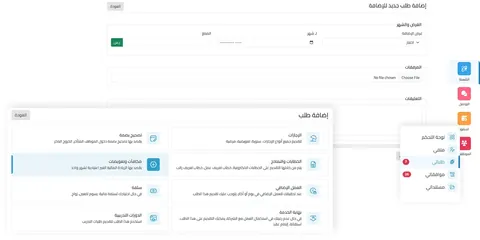 1
Submit the request
The employee submits a bonus or compensation request from their account.
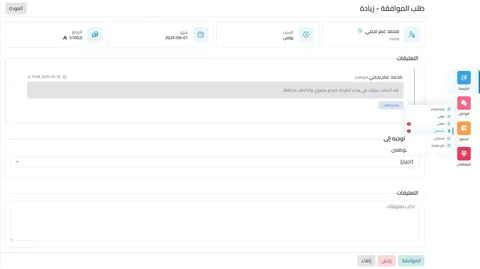 2
Approve the request
The request goes through the defined approval workflow.
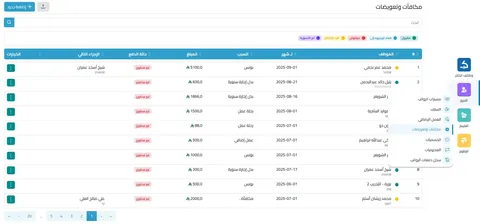 3
Add to salary
The amount is added to the required month's salary as unpaid.
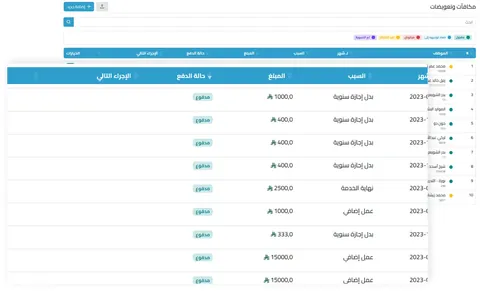 4
Payment and update
The status changes to “Paid” once it is included in payroll and paid out.
A forgotten entitlement doesn't need a new payroll run
The traditional way
- A salary error means rerunning payroll
- Bonuses approved verbally
- No way to tell what was paid and what was not
- Employees asking about their dues
With Ektefa
- Compensation added to the selected month's salary
- A documented approval chain
- A clear payment status for every addition
- Requested from the employee's account and tracked
What your organization gains
Fix errors quickly by adding compensations to salary without complications
More efficient financial operations by automating steps and linking them to payroll
Greater employee satisfaction by securing their pay without delay
More transparency through the approval chain and precise tracking
An HR app for every employee
The Ektefa self-service app for Apple, Android and Huawei: employees clock in and request leave, and managers approve requests from their phone without opening the web version.
- Your profileComplete employee profile.
- Attendance correctionRequests without paperwork.
- Leave requestLeave in one tap.
- Instant messagingDirect contact with management.
More in Payroll & Wages
Frequently asked questions: Bonuses & Compensations
Still have a question? Call us on 920010047 or [email protected].
All FAQsRequestCan employees request a bonus or compensation themselves?
Yes. The employee submits the request from their personal account, and it follows a defined approval workflow.
SalaryHow is a bonus added to the salary?
Once approved, the amount is added automatically to the selected month's salary and recorded as “Unpaid” until it is included in payroll and paid out, then it changes to “Paid”.
ErrorsWe miscalculated an employee's dues. What should we do?
Add a compensation for the amount due, and it is added to the selected month's salary through the approval workflow, without complications.
PricingHow much does Bonuses & Compensations cost with Ektefa?
Bonuses & Compensations is part of the integrated Ektefa system. Your subscription is based on the number of active employees and includes every system feature, with no extra user licenses. Calculate the exact price for your company with the pricing calculator on the Pricing & Plans page.
Strengthen payroll accuracy and fairness with Ektefa
An integrated system that keeps employees satisfied and your company compliant. A live demo on your own case before you subscribe.