
Ektefa · Self-Service · Requests
Employees request from their phone, managers approve from theirs
Every request is routed automatically to approvers under an approval policy tailored to its type, with instant notifications and a clear record, and is linked to payroll, training and leave.

From an employee's request to a decision in the manager's pocket
No chasing signatures: the path is set in advance for each request type.
- App
- Platform
A complete digital approval cycle
Speed for employees, clarity for managers, and a record for the company.
High flexibility
Each request type has its own features, suited to its nature.
Custom approval policies
A different approval policy for each request, through settings and permissions.
Mobile management
Managers and approvers approve directly from the mobile app.
Instant notifications
Managers are notified when a new request awaits approval.
Full integration
Requests linked automatically to payroll, training and leave.
How Requests works in Ektefa
4 steps, from setup to results.
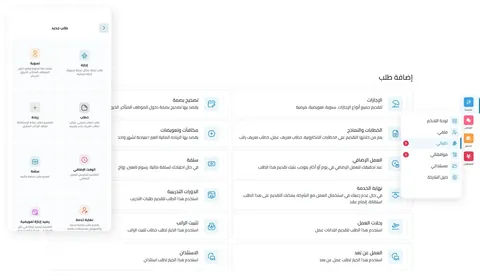 1
Submit the request
The employee submits the request via the platform or the app.
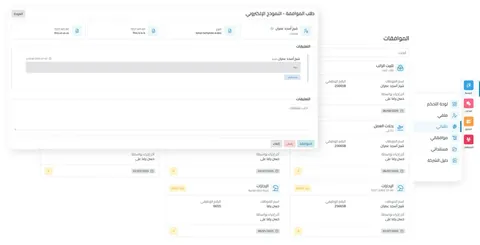 2
Forward to approvers
The request is routed automatically to the authorized manager or official.
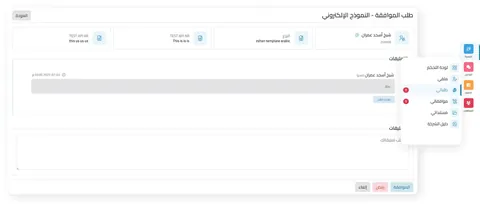 3
Review and approve
Approvers review the request and decide.
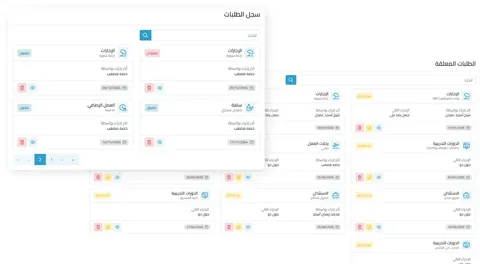 4
Notifications and updates
The employee is notified of the outcome instantly.
A paper request waits for a signature. A digital one doesn't.
The traditional way
- A paper form circulating between offices
- Employees don't know where their request stands
- Managers sign when they get back to the office
- No clear record of decisions
With Ektefa
- Requests from the app or the platform
- Instant notification of the outcome
- Approval from the manager's phone
- A clear record of requests and approvals
What your organization gains
Faster procedures by fully automating the request and approval cycle
Greater transparency with a clear record of requests and approvals
A smooth employee experience with requests from anywhere
Administrative time and effort saved by relying on digital channels
An HR app for every employee
The Ektefa self-service app for Apple, Android and Huawei: employees clock in and request leave, and managers approve requests from their phone without opening the web version.
- Your profileComplete employee profile.
- Attendance correctionRequests without paperwork.
- Leave requestLeave in one tap.
- Instant messagingDirect contact with management.
More in Self-Service
Frequently asked questions: Requests
Still have a question? Call us on 920010047 or [email protected].
All FAQsPathCan I set a different approval path for each request?
Yes. You can define a different approval policy for each request type through settings and permissions, and each type has its own features, suited to its nature.
MobileCan managers approve from their phone?
Yes. Managers and approvers review and approve requests directly from the mobile app, and they are notified when a new request arrives.
IntegrationAre requests linked to payroll and leave?
Yes. Requests are linked automatically with other HR modules such as payroll, training and leave.
PricingHow much does Requests cost with Ektefa?
Requests is part of the integrated Ektefa system. Your subscription is based on the number of active employees and includes every system feature, with no extra user licenses. Calculate the exact price for your company with the pricing calculator on the Pricing & Plans page.
Faster, clearer procedures for your employees with Ektefa
Make all your employee procedures faster, easier and more transparent. A live demo on your own case before you subscribe.